
Electric scooters have experienced a surge in popularity over the past few years, ranging from…
Locate the reset button on an electric scooter
Electric scooters are gaining popularity due to their fun driving experience, speed, and convenience as an alternative to walking or public transport. Like all electronic devices, e-scooters can sometimes face issues such as throttle glitches, battery errors, or software malfunctions.
If your e-scooter is not working properly, this problem can be resolved by performing a proper reset. Before attempting this, it’s essential to understand the location of the reset button on your electric scooter and the appropriate procedure for performing the reset safely.
The word”re-set” means to set, adjust, or fix something in a new or different way. It is a feature that helps your electric scooter achieve optimal functioning by restoring default settings or resolving minor temporary glitches. Some modern scooters also use a Battery Management System (BMS) reset or an app-based reset to fix battery or connectivity issues.
There are two main functions of the reset button on an electric scooter:
Hardware reset:
A Hardware reset is also well known as a factory reset. Its main work is to reset the device to its factory settings. It erases data, settings, applications, and customisations. It cleans and returns to its basic state.
Hardware reset is useful when your scooter faces persistent software issues or needs to restore factory settings after major changes.
Software reset :
A Software reset occurs when you press the reset button on your device. Its function is to reboot the software and operating system without affecting any hardware configuration. It resolves many glitches without losing any user information and data.
A software reset resolves most minor glitches, but if the issue is battery-related, a BMS reset may be required.
Follow these easy steps to reset your electric scooter:
Safety first:
Safety is the first priority when resetting your electric scooter. Always wear protective gloves and ensure the scooter is switched off. Place it on a flat, stable surface to prevent accidental falls. Before starting, check that there is no visible water damage, loose wires, or swollen batteries, and avoid using metal tools near electrical components.
Locate the reset button:
The reset button on an electric scooter varies from model to model. In some brands, it is on the handlebar dashboard, near the charging port, or underneath the scooter’s deck, close to the battery compartment.
For example, Xiaomi M365 often uses a combination of the power and brake buttons, Segway Ninebot scooters rely on the companion mobile app, and Razor E-series scooters feature a physical button near the charger port.
Note : It is always advisible to read the manual fisrt as it often provides specific instructions for resetting the power button. Different models may have different procedure.
Disconnect the battery:
To reset the electric scooter, you may need to disconnect the battery. This will work only if the electric scooter has a removable battery. Follow the steps:
- The battery compartment is located under the footboard of the vehicle.
- Open the cover carefully using a screwdriver.
- Disconnect the battery by removing the connectors, but be careful not to damage the wires.
Note : Please wait for atleat 5 to 10 minutes after disconnecting the battery. It helps the electric scooter to discharge any remaining power in it.
Reconnect the battery:
You need to reattach the connectors, ensuring all the connections are tight and secure. Close the battery compartment by using the screwdriver.
Process of resetting the button:
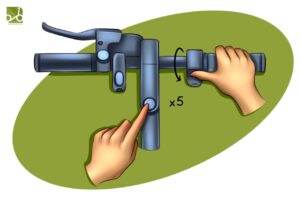
- To start an electric scooter, turn it off first. If it’s not ready off, press the power key and hold it until the display is blacked out.
- With the help of both hands, press the power button, throttle, and brake simultaneously.
- Wait for a few seconds in this position.
- You will hear a beeping sound from the e-scooter shortly.
- You release all buttons, including the brake, as the reset is completed.
- Bluetooth and other settings are reset, and your e-scooter is ready to be paired and connected to your smartphone.
- Take a test ride and check if the e-scooter is responsive to its throttle, brake, and other functions.
- It’s also advisable to consult your e-scooter’s manual for specific instructions.
- If you have any unresolved issues with your electric scooter, please contact the manufacturer for repair assistance.
Reasons for resetting :
- Quick drainage of the battery.
- Slow acceleration.
- Throttle issue.
- Any Glitch.
- Software update.
Note : Be aware as in some cases your warranty may affect. Check you user manual before doing anything or if you are unsure.
FAQ
- Is it safe to reset the electric scooter?
Ans: Yes, it is safe if you follow the proper steps and take the necessary precautions while resetting the electric scooter.
2. How long does resetting take?
Ans: The entire process of resetting, including discharging the electric scooter, takes approximately 10 to 15 minutes.
3. Why should I reset my electric scooter?
Ans: Resetting the electric scooter resolves minor software glitches, restores the default settings, and improves performance.
4. Will resetting delete the electric scooter’s data?
Ans: Yes, resetting erases custom settings. For example, if you have adjusted speed settings or connected the scooter to your mobile application. It will be changed to its original manufacturer settings.
5. What if resetting doesn’t solve the problem?
Ans: Resetting is generally safe if proper precautions are taken. The entire process, including battery discharge, typically takes 10–15 minutes. It resolves minor software glitches and restores default settings, but custom settings will be erased. If issues persist after a reset, it may indicate a hardware problem or a faulty battery; in such cases, contacting the manufacturer is recommended.
Conclusion:
Every user needs to know how to reset the e-scooter. The technique mentioned in the article will be useful in helping you resolve minor issues on your own. Always know electric scooter safety tips to help ensure a safe and enjoyable ride. If you still face difficulty, do not hesitate to seek the help of a professional.

Related Posts
This Post Has 0 Comments